Works on your Mac in Safari or Chrome. Needs an Android phone. No Mac app to install, no account.
There is no Phone Link for Mac
Microsoft's Phone Link is a Windows feature. Its own requirements page asks for a PC running Windows 10 or 11, there is no macOS build and no browser extension, so nothing you install on a Mac will run it. What follows is how to get the part you probably came for.
Prefer Safari? Open app.reflecto.dev instead. Last updated August 13, 2026
Is there a Phone Link for Mac?
No. Phone Link runs on Windows and only on Windows. Microsoft's requirements page lists a PC running Windows 10 or Windows 11; there is no macOS application, and no browser extension that would let a Mac stand in for one.
That is not a shortcoming on Microsoft's part. Phone Link is a Windows feature, built for Windows, and it does that job well — it is genuinely the best answer to this question if you own a PC. It is simply not available to you on a Mac, and no amount of searching will change that.
If you also use a Windows PC, use Phone Link there. This page is about the Mac.
Before anything else: which phone do you have?
This matters more than the Mac does, and it is worth settling before you install anything.
- An iPhone? Then nothing here helps, and it is better to hear that now. iOS does not let a third-party app read your notifications, so no tool of this kind can mirror them. If you have an iPhone and a Mac, Apple's own Continuity features already cover most of what Phone Link does.
- An Android phone? Then the rest of this page is for you. Notifications, clipboard and files can all reach your Mac.
What to use on a Mac instead
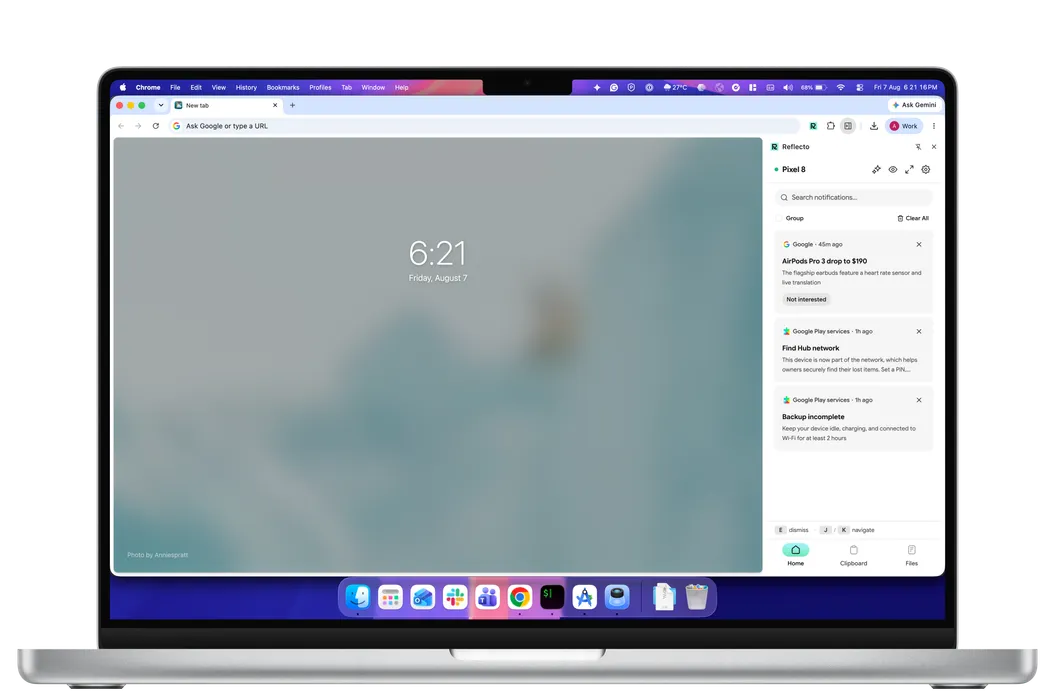
Reflecto covers the part of Phone Link most people actually miss: your phone's notifications, on the computer in front of you, where you can act on them.
- Notifications on your Mac — every alert, call and message as it arrives, with reply and dismiss from the keyboard. Clearing it on the Mac clears it on the phone.
- A shared clipboard — copy on one device, paste on the other, in both directions. Nothing is written to your clipboard until you tap it.
- Files, device to device — encrypted chunk by chunk before they leave your phone, peer-to-peer when the two can reach each other and relayed as ciphertext when they cannot, and resumable if the connection drops.
- Your AI agents — Claude or ChatGPT can ping your phone when a job finishes. One honest exception: an assistant holds no keys, so a message it sends is composed on our server and held in memory only long enough to encrypt it to your devices. Mirroring never works that way.
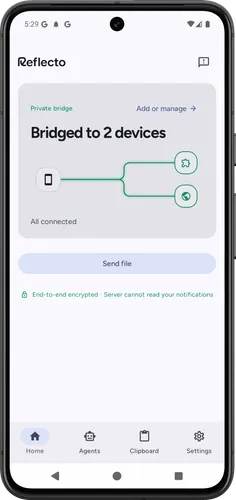
It runs as a Chrome extension in a side panel, or as a web app at app.reflecto.dev that works in Safari too. There is no Mac app to install and no account to create.
The difference worth knowing
Beyond the platform, the two products make different promises about your data — or rather, one of them makes a promise. Microsoft publishes no end-to-end encryption claim for Phone Link, and we are not going to assert one either way on their behalf.
Ours we can state plainly: Reflecto encrypts on your phone and decrypts on your Mac using per-device keys, so what the server routes is something it cannot read. You do not have to take that on faith either. Each pair of devices shows a 60-digit safety number derived from their public keys; read one against the other, and if the digits match, nothing is sitting in between.
One thing Phone Link does that Reflecto does not: send texts from the computer as a messaging app. Reflecto replies from a notification, in apps that offer a reply action, and does not show chat history.
Phone Link, and the alternatives that run on a Mac
Phone Link is the clean case here: Windows only, so on a Mac it is not an option at all. Here is how the rest compare.
| Feature | Reflecto | Pushbullet | Phone Link | KDE Connect |
|---|---|---|---|---|
| End-to-end encryption | On by default, per-device keys | Optional, off by default — one shared password typed into every device; covers mirroring, clipboard and SMS only | Not claimed — no published end-to-end encryption statement | Yes, direct device-to-device |
| Desktop platforms | Anywhere Chrome runs | Windows only — no macOS or Linux app | Windows PC only | macOS, Windows, Linux |
| Free tier limits | No message quota | 100 messages/month; 25 MB file transfers | Free | Free |
| Chrome extension | Manifest V3 | Manifest V2 — disabled by Chrome since July 2025 | None | Plasma Integration (needs Plasma desktop) |
| AI agent integration | Claude, ChatGPT, MCP | No official MCP server | No public agent/MCP API (Copilot's phone connection is first-party only) | None official |
| Active development | Shipping continuously | Extension 2023 · blog 2022 · API docs 2020 | Yes | Active (community) |
What Reflecto is not
- Not a native Mac app. A Chrome extension, or the web app.
- Not a Phone Link port, and not affiliated with Microsoft. It is a different product that covers overlapping ground.
- Not a desktop SMS client. Replying happens from a notification, in apps that offer a reply action.
- No screen mirroring, and no remote control of your phone.
- The phone has to be an Android phone. iOS does not allow third-party apps the access this needs.
If the guides you found were older than this page, we wrote up what the old Android-on-Mac guides get wrong.
Phone Link on a Mac: questions
Is there a Phone Link for Mac?
No. Phone Link is a Windows feature — Microsoft's own requirements page lists a PC running Windows 10 or Windows 11, and there is no macOS version or browser extension. Nothing you install on a Mac will run it.
So what do I use on a Mac instead?
Reflecto covers the part most people want from Phone Link: your Android phone's notifications on your computer, with reply and dismiss, plus two-way clipboard and device-to-device file transfer. It runs in Safari or Chrome rather than as a Mac app.
I have an iPhone. Does this help me?
No, and it is better to say so here than after you install something. iOS does not let a third-party app read your notifications, so Reflecto needs an Android phone. If you have an iPhone and a Mac, Apple's own Continuity features already cover most of this.
Can I send texts from my Mac the way Phone Link does from a PC?
Not as a messaging app. You can reply to a message notification when the app on your phone offers a reply action, and the reply is sent by your phone. Reflecto is not a desktop SMS client and does not show your chat history.
How does the encryption compare?
Microsoft publishes no end-to-end encryption claim for Phone Link, and we are not going to assert one either way on their behalf. What we can tell you is ours: Reflecto encrypts on your phone and decrypts on your Mac with per-device keys, so the server routes something it cannot read. Each pair of devices shows a 60-digit safety number, derived from their public keys, that you can read against each other to check exactly that.
Do I need a Microsoft account, or any account at all?
Neither. Reflecto has no accounts of any kind — no Microsoft account, no Google sign-in, no email. Pairing is a six-digit code typed into both devices, and the encryption keys are generated on the devices themselves.
Keep your phone in your pocket
Reflecto is live and free today. Add the extension, pair your phone, and the bridge does the rest.