Works on your Mac in Safari or Chrome. Needs an Android phone. No Mac app to install, no account.
Send files from Android to your Mac
Pick a file on your phone, choose your Mac, and it arrives there. No emailing it to yourself, no cable, and nothing in the middle that can read it — every chunk is encrypted before it leaves the device that sent it.
Prefer Safari? Open app.reflecto.dev instead. Last updated August 13, 2026
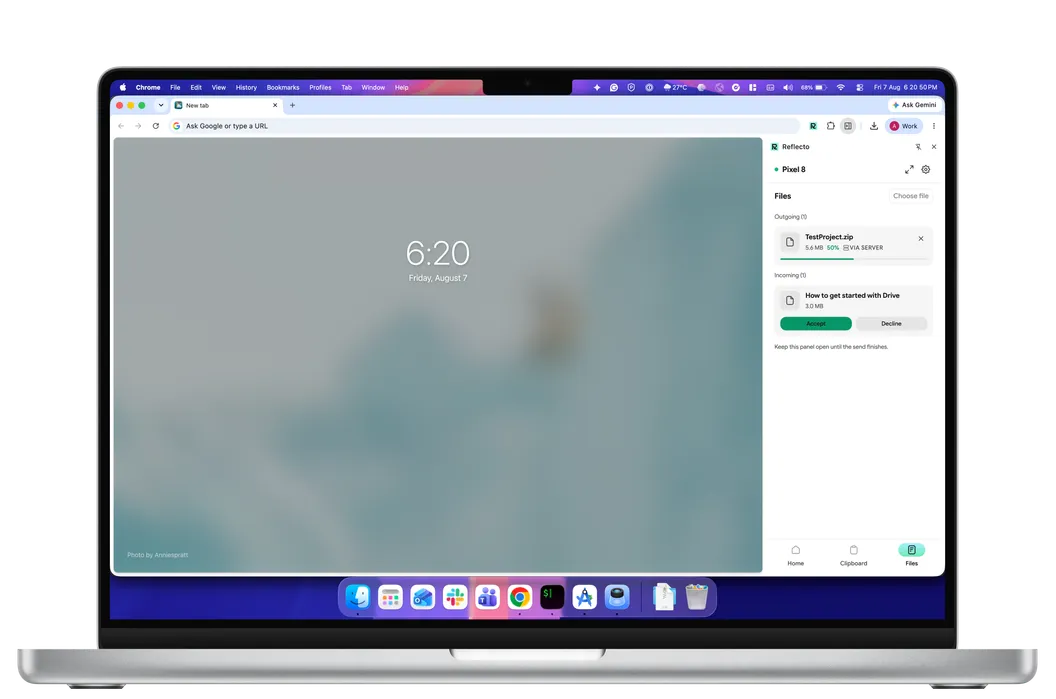
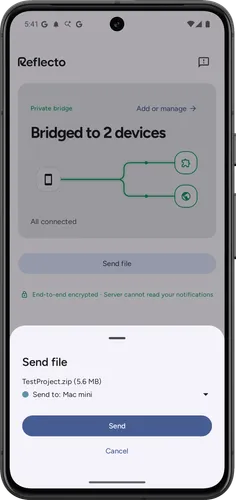
How to transfer files from Android to a Mac
Pair the two devices once with a six-digit code. After that, sending is two taps from wherever you already are.
- From your phone. Share a file to Reflecto, or open the app and choose Send file. Pick the Mac you want it on.
- On your Mac. The transfer appears in the panel. Accept it, and choose where to save.
- The other direction works too. Choose a file on your Mac and it lands on your phone the same way.
Both devices confirm. Nothing arrives on a machine without someone there agreeing to receive it.
Where the file actually goes
Worth being precise about, because "direct" gets used loosely in this category and the honest answer is more interesting than the marketing one.
Reflecto tries a direct connection between the two devices first. When that works — often on the same network — the file never touches our infrastructure at all.
When it cannot, because the devices are on different networks or a firewall is in the way, the transfer relays through encrypted storage instead of failing. The panel tells you which one you got rather than hiding it.
Either way the bytes are encrypted before they leave the sending device, in chunks, so what a relay holds is ciphertext it cannot open. Relayed parts are deleted within 12 hours — the same 12 hours written into our privacy policy, which names the storage provider rather than leaving you to wonder.
It resumes instead of starting over
Files go in chunks, and the transfer picks up from the last chunk that arrived. A dropped connection halfway through a large file costs you the remainder, not the whole thing.
That is the difference between large transfers being practical and being a gamble you avoid — which is usually why people fall back to email attachments and compression in the first place.
Why AirDrop does not solve this
AirDrop is superb, and it is Apple-only. If the phone in your pocket runs Android, the feature your Mac already has does not see it, and nothing in macOS fills the gap.
That leaves the usual workarounds: emailing a file to yourself, uploading it to a drive you then have to clean up, or finding a cable. Each one works and each one puts a copy somewhere you did not really want one.
Files are one of four things the same bridge carries. The others are notifications and the clipboard, plus pings from your AI agents.
How the alternatives handle files
File transfer is one column of a wider picture. Here is how the tools people usually compare on this compare across everything else.
| Feature | Reflecto | Pushbullet | Phone Link | KDE Connect |
|---|---|---|---|---|
| End-to-end encryption | On by default, per-device keys | Optional, off by default — one shared password typed into every device; covers mirroring, clipboard and SMS only | Not claimed — no published end-to-end encryption statement | Yes, direct device-to-device |
| Desktop platforms | Anywhere Chrome runs | Windows only — no macOS or Linux app | Windows PC only | macOS, Windows, Linux |
| Free tier limits | No message quota | 100 messages/month; 25 MB file transfers | Free | Free |
| Chrome extension | Manifest V3 | Manifest V2 — disabled by Chrome since July 2025 | None | Plasma Integration (needs Plasma desktop) |
| AI agent integration | Claude, ChatGPT, MCP | No official MCP server | No public agent/MCP API (Copilot's phone connection is first-party only) | None official |
| Active development | Shipping continuously | Extension 2023 · blog 2022 · API docs 2020 | Yes | Active (community) |
What Reflecto is not
- Not a native Mac app. A Chrome extension, or the web app.
- Not a sync folder. Files go to a device you pick, when you send them — nothing mirrors a directory in the background.
- Not an AirDrop implementation. It does not appear in the macOS share sheet.
- Not cloud storage. Nothing is kept for you to come back to later.
- The phone has to be an Android phone. iOS does not allow third-party apps the access this needs.
File transfer questions
How do I send a file from Android to a Mac?
Pair the two once with a six-digit code, then send from the share sheet on your phone or by choosing a file in the panel on your Mac. It goes to that device, not to a folder you both have to remember to check.
Does the file go through your servers?
Sometimes, and only ever as ciphertext. Reflecto tries a direct peer-to-peer connection first; when that is not possible — different networks, a firewall in the way — it relays through encrypted object storage instead, and the panel labels which one you got. Every chunk is encrypted on the sending device before it leaves, so the relay holds something we cannot open, and it is deleted within 12 hours.
Is it faster than emailing it to myself?
Usually, and it is certainly less work. There is no attachment limit to work around, no compression step, and nothing lands in your inbox afterwards. On a direct connection the file does not leave your network at all.
What happens if my connection drops halfway?
It resumes. Files are sent in chunks and the transfer picks up from the last one that arrived rather than starting over, which is the difference between a large file being practical and being a gamble.
Do I need AirDrop, or is this a replacement for it?
AirDrop does not work with Android at all, which is usually why people end up here. This covers the same need across that boundary. It is not an AirDrop implementation and does not appear in the macOS share sheet.
Is there a Mac app to install?
No. On a Mac this runs as a Chrome extension in a side panel, or as the web app at app.reflecto.dev, which works in Safari too. The phone has to be an Android phone.
Keep your phone in your pocket
Reflecto is live and free today. Add the extension, pair your phone, and the bridge does the rest.