Works on your Mac in Safari or Chrome. No Mac app to install, no account, no email.
Your Android clipboard, on your Mac
Copy an address on your phone and paste it on your Mac. Copy a link on your Mac and it is on your phone. Every clip is encrypted on the device that sent it and decrypted only on the one that receives it, and nothing reaches your clipboard until you tap it.
Prefer Safari? Open app.reflecto.dev instead. Last updated August 11, 2026
How to share a clipboard between Android and Mac
Install Reflecto on your phone, open it on your Mac, and pair the two with one six-digit code. The clipboard is part of the same bridge, so there is nothing extra to switch on.
- On your phone. Install Reflecto from Google Play.
- On your Mac, pick either one. Add the Chrome extension for a side panel beside your work, or open app.reflecto.dev in Safari.
- Pair them. Type the six-digit code your Mac shows into your phone. Keys are generated on both devices and never sent anywhere.
Nothing lands on your clipboard behind your back
This is the part that differs from most sync tools, and it is a deliberate design rule rather than a missing feature.
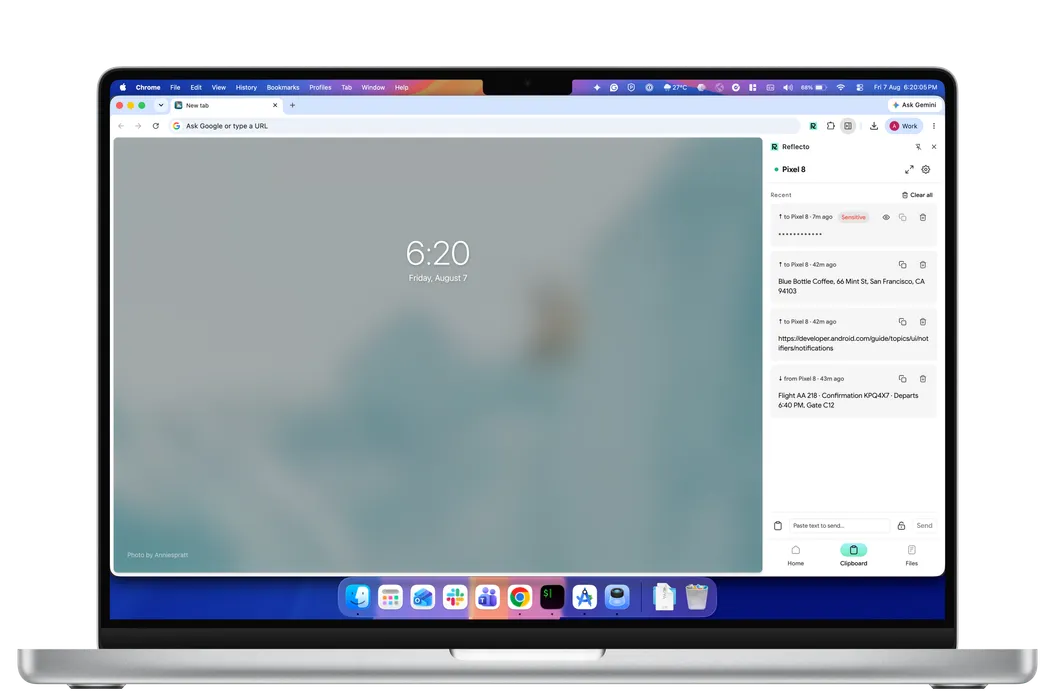
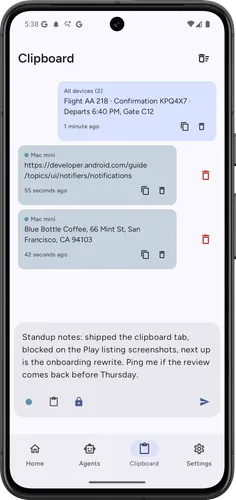
A clip that arrives does not replace what is on your clipboard. It appears in a list and waits. You tap it, and only then is it written. That holds in both directions and on every surface — phone, Safari, Chrome.
The reason is simple: your clipboard is where you keep the thing you are about to paste. Silently overwriting it, from another device, at a moment you did not choose, is a good way to paste the wrong thing into the wrong window. It is also how a password ends up somewhere it should not be.
- Sensitive clips stay masked. Mark a clip sensitive when you send it and it shows as dots until you reveal it. Reveal is per clip and re-masks when you switch away. Copying works while masked, so you never have to display a password to use it.
- Every clip is labelled with where it came from. "Mac mini" or your phone's name, so a list of clips from several devices stays legible.
- History is local. It lives on the machine that received it and is wiped when you unpair. The server routes an encrypted blob it cannot read.
What it syncs, and what it does not
Text, today. That covers the things people actually move between a phone and a laptop: a link, an address, a confirmation code, a paragraph you drafted on the train.
Image clips are not supported on the Mac yet. Files are a separate feature rather than a clipboard one — Reflecto sends the file itself between your phone and your Mac, encrypted before it leaves, which is a better fit than pushing megabytes through a clipboard.
If you came here for notifications rather than the clipboard, that is the other half of the same bridge: Android notifications on your Mac.
Why Universal Clipboard does not help here
Universal Clipboard is genuinely good, and it works between Apple devices. That is the whole problem if the phone in your pocket runs Android: the feature your Mac already has does not reach it, and nothing in macOS fills the gap.
Reflecto crosses that boundary without asking you to change phone. It also keeps the tap-to-write behaviour above, which Universal Clipboard does not — Apple's version replaces your clipboard silently, which is the right call inside one trusted ecosystem and a worse one across a bridge you set up yourself.
What else moves between your phone and your Mac
The clipboard is one of four things the same bridge carries. Here is how the alternatives compare across all of it.
| Feature | Reflecto | Pushbullet | Phone Link | KDE Connect |
|---|---|---|---|---|
| End-to-end encryption | On by default, per-device keys | Optional, off by default — one shared password typed into every device; covers mirroring, clipboard and SMS only | Not claimed — no published end-to-end encryption statement | Yes, direct device-to-device |
| Desktop platforms | Anywhere Chrome runs | Windows only — no macOS or Linux app | Windows PC only | macOS, Windows, Linux |
| Free tier limits | No message quota | 100 messages/month; 25 MB file transfers | Free | Free |
| Chrome extension | Manifest V3 | Manifest V2 — disabled by Chrome since July 2025 | None | Plasma Integration (needs Plasma desktop) |
| AI agent integration | Claude, ChatGPT, MCP | No official MCP server | No public agent/MCP API (Copilot's phone connection is first-party only) | None official |
| Active development | Shipping continuously | Extension 2023 · blog 2022 · API docs 2020 | Yes | Active (community) |
What Reflecto is not
- Not a native Mac app. A Chrome extension, or the web app.
- No Safari or Firefox extension. In Safari, Reflecto is the web app rather than a side panel. Firefox is not tested yet.
- Image and file clips are not supported on the Mac yet.
- Not an always-on clipboard replacement. Clips wait for a tap rather than overwriting what you have.
- The phone has to be an Android phone. iOS does not allow third-party apps the access this needs.
Clipboard questions
Does copying on my phone put it straight on my Mac's clipboard?
No, and that is deliberate. The clip arrives on your Mac and waits. You tap it to put it on your clipboard. Nothing Reflecto receives is written to your clipboard without you asking for it, in either direction.
Does it work the other way round?
Yes. Copy on your Mac, send it, and it appears on your phone. The phone posts a notification you tap to write it to the Android clipboard, the same way round as on the Mac.
Can I sync images or files, or just text?
Text today. Image clips are not supported on the Mac yet. For files, Reflecto has a separate device-to-device file transfer that sends the file itself between your phone and your Mac rather than routing it through the clipboard.
What happens with passwords and one-time codes?
Any clip can be marked sensitive when it is sent, and a sensitive clip stays masked in the list until you reveal it. Reveal is per-clip, and it re-masks when you switch away. Copying still works while it is masked, so you never have to show a password to use it.
Where are the clips stored?
On your own devices. The history lives locally on the machine that received it, and it is wiped when you unpair. The server routes an encrypted blob it cannot read, so it never holds your clipboard.
Is this like Universal Clipboard?
It solves the same problem across a boundary Apple does not cross: Universal Clipboard works between Apple devices, so an Android phone is not part of it. The behaviour differs in one way worth knowing — Reflecto shows you the clip and waits for a tap rather than silently replacing what is on your clipboard.
Do I need the Chrome extension?
No. The web app at app.reflecto.dev works in Safari and Chrome and includes the clipboard. The Chrome extension adds a side panel that sits beside your work rather than in a tab.
Keep your phone in your pocket
Reflecto is live and free today. Add the extension, pair your phone, and the bridge does the rest.